Chop A Forest: How to Chop Trees and Pick Up Logs
Chop down any tree in Chop A Forest by hitting it repeatedly until it breaks, then hold E on PC to pick up the logs it drops. Steps, carry limits and faster cutters, explained.
Chopping down a tree in Chop A Forest is a two-part job: hit a standing tree with your current cutter until it breaks, then pick up the wood pieces it drops on the ground. Your bare fists work from the very start of a run — before you've bought anything — and the cutters you buy after that, starting with the axe, cut faster than punching.
Step 1: Hit the tree until it breaks
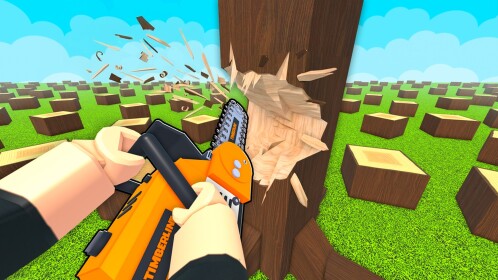
Walk up to any standing tree and keep attacking it with your current cutter. That is the whole felling mechanic — the game's own loop line is “Break Trees to Collect logs,” and recorded fresh runs fell trees by punching or chopping a standing tree until it breaks. Three things are worth knowing while you hit:
- Fists work, but they're slow. A new player starts with bare hands, and one fresh-run player found punching “actually taking really long.” It gets the job done — it just costs patience.
- A bought cutter is faster. The first purchasable cutter shown in early fresh-run footage was an axe at 150 coins, and its first swings cut visibly faster than punching — an early-run observation, not a fixed catalog price.
- Trees take several hits. Damage upgrades raise the damage each hit deals, though they don't guarantee quick fells — in one recorded run, a player with damage upgrades still needed three hits on a tree.
Step 2: Pick up the dropped logs
When the tree breaks, its wood drops as separate pieces right where the tree stood. Nothing is collected automatically — walk over to the pieces and gather them by hand.
- On PC, hold E over the dropped wood to collect it. Each pickup adds to your personal log count — one player watched theirs climb from 50 to 80 logs during a single haul.
- Logs travel with you. Collected pieces stay in your carry count until you take them to a sell point; selling is its own separate step after pickup.
Mind your carry limit
You can only hold so many pieces at once. In early runs, one player's bag held 10 items and another couldn't pick up more than five pieces at a time; the exact starting capacity isn't stated. The fix is a backpack — purchases in one run cost 175 and then 750 coins, and they let the player collect more wood per trip.
Until you can afford one, work with the limit: fill your carry count, take the load to a sell point, and come back for the rest.
Faster ways to cut, once you have coins
The tool shop stocks more than the axe. One visit showed a saw listed beyond it, plus dynamite at 2,500, and explosives genuinely fell trees: one blast destroyed a tree and its stump, and a thrown bomb took down about three trees at once. Those are single observed examples rather than guaranteed yields. For where each cutter sits in the shop, see the tool progression guide.
Every tree type shown chops the same way
The forest mixes visually distinct wood: plain oak trees, white wood that one player described as rarer and more valuable, candy trees, a golden variant, and rainbow timber. Every type shown so far went down to the same repeated chopping — none has needed a different procedure. Whether tougher variants take more hits or need a specific tool hasn't been established.
After the logs are yours
Pickup is where this task ends. Logs then get carried to a sell point and turned into coins, which is a separate workflow covered in how to sell logs. If your goal is bigger than one tree, clearing the entire forest for the payout has its own guide, and brand-new players can pick up the basics in the beginner guide.
Related Guides
How to Sell Logs for Coins
Find the sell spot, deliver your logs on foot or by car, and confirm your Coins arrived.
Tools List: Every Cutting Tool
Compare every cutting tool from fists to vacuum, with prices, Robux options and what each one actually does.
Tool Upgrades: Tab Menu and Costs
Open the Tab upgrade menu, buy each upgrade line with Coins, and see what every stat improves.
How to Clear the Forest
See how to clear the forest zone by zone, spot the signs an area is done, and reach the money pile.